
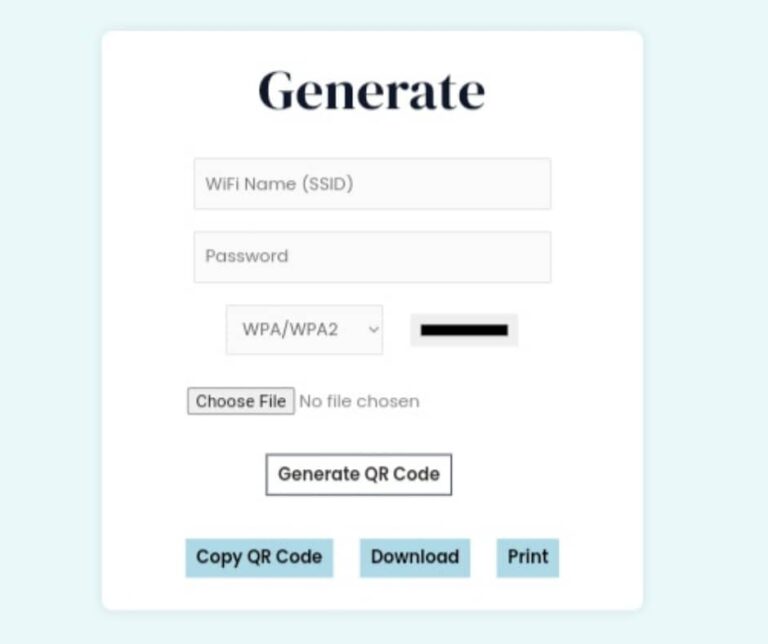
Tired of scribbling down complex WiFi passwords on napkins for guests or watching them fumble with typos on their phones? In today’s fast-paced world, sharing WiFi access shouldn’t be a hassle. That’s where a free QR code generator for WiFi networks comes in—it’s a game-changer for homes, cafes, hotels, and events. By simply scanning a QR code, anyone can connect to your network instantly, no typing required. With QR code scans projected to surge 22% by 2025, tools like these are more essential than ever. In this guide, we’ll explore the best options, how they work, and why bclick’s QR Code for WiFi tool at bclick.com.ng/qr-code-generator stands out as the simplest, most reliable choice. Let’s get your network shared seamlessly!
What Is a Free QR Code Generator for WiFi Networks?
So, what exactly is a free QR code generator for WiFi networks? It’s an online tool that creates a scannable QR code embedded with your WiFi details—like SSID (network name), password, and encryption type (e.g., WPA2). Scanning it with a smartphone camera auto-connects the device to your network, saving time and reducing errors.
According to Juniper Research, over 2.2 billion people will use QR codes by 2025, with WiFi sharing being a top application. This is especially handy in high-traffic spots: imagine a bustling Nigerian cafe where customers scan and connect in seconds, boosting satisfaction without you repeating passwords endlessly. No downloads, no costs—just pure convenience.
Benefits of Using a WiFi QR Code Generator
Why bother with a WiFi QR code generator? Beyond the obvious ease, here are the key perks backed by real-world trends:
- Instant Connectivity: Guests join your network in under 10 seconds—no more “What’s the password again?” moments. A 2025 Scanova report notes that with 6.8 billion smartphone users globally, QR adoption has exploded post-pandemic for contactless access.
- Enhanced Security: Credentials are encrypted in the code, visible only to scanners. This cuts unauthorized access risks, ideal for guest networks.
- Branding Boost: Customize codes with logos or colors to promote your business—perfect for events or small shops.
- Cost Savings: Free tools mean zero expense, yet they save hours of manual sharing. In the U.S. alone, QR scans for access like WiFi are expected to hit 99.5 million users by 2025.
- Analytics Potential: Advanced generators track scans, helping you monitor usage (e.g., peak guest times).
Picture this: You’re hosting a family gathering in Lagos. Instead of yelling passwords over music, print a branded QR code. Everyone connects effortlessly, and you focus on the fun.
How to Use a Free QR Code Generator for WiFi Networks
Getting started is straightforward. Here’s a step-by-step guide to generating your first WiFi QR code:
- Choose Your Tool: Opt for a reliable free QR code generator for WiFi networks like bclick’s—no sign-ups needed.
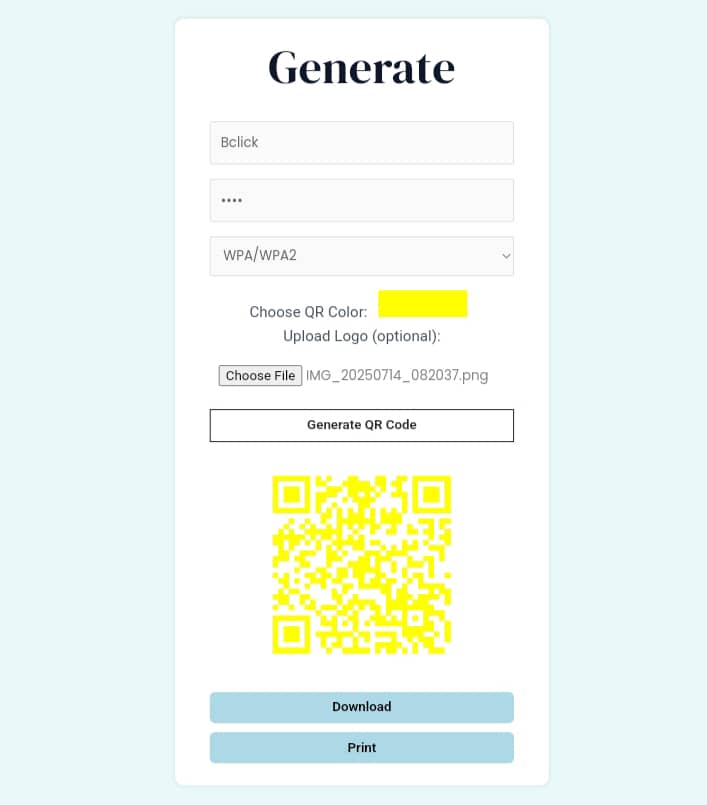
- Enter Details: Input your SSID, password (case-sensitive), and encryption (WPA/WPA2 for most modern networks). Leave password blank for open access.
- Customize (Optional): Add colors, logos, or frames for a professional touch.
- Generate & Download: Hit create, then save as PNG or PDF.
- Test & Share: Scan with your phone to verify. Print on stickers, menus, or display digitally.
Pro tip: For hidden networks, toggle the “hidden” option in the tool. Most smartphones (iOS 11+, Android 10+) support native scanning.
Top Free QR Code Generators for WiFi Networks in 2025
We’ve tested the landscape—here are the standout free WiFi QR code generators, compared in a quick table:
| Tool | Key Features | Limitations | Best For |
|---|---|---|---|
| bclick QR Code for WiFi | Instant gen, unlimited free use, customizable designs | Basic analytics (premium upgrade) | Small businesses & homes |
| QRStuff | 20+ types, color options | Watermark on free tier | Quick one-offs |
| QR Code Generator Pro | Hidden network support, no expiry | Ads during generation | Hotels & events |
| QiFi | Pure JS (no server), offline | Minimal customization | Privacy-focused users |
| ME-QR | Multi-QR support, branding | Login for advanced edits | Marketing pros |
Bclick’s tool tops the list for its no-fuss approach—head to try it free, click here.
Why Choose bclick’s QR Code for WiFi?
Among the sea of options, bclick’s QR Code for WiFi generator is the ultimate free QR code generator for WiFi networks. Tailored for Nigerian users and global audiences, it generates codes in seconds with zero sign-up. Key highlights:
- Unlimited Free Access: Create as many as you need—no caps or hidden fees.
- User-Friendly Interface: Enter details, customize, and download—done in under a minute.
- Secure & Customizable: Supports WPA3 encryption and adds your logo for branded WiFi sharing.
- Mobile-Optimized: Works flawlessly on any device, aligning with the 7.33 billion smartphones expected by 2025.
Whether you’re a cafe owner streamlining customer logins or a homeowner prepping for visitors, this tool eliminates friction. Users rave about its speed: “Finally, a free tool that just works!” Don’t wait—generate your WiFi QR code free today.
Common Mistakes to Avoid When Generating WiFi QR Codes
Even the best generate WiFi QR code tools can’t fix user errors. Steer clear of these pitfalls:
- Ignoring Encryption: Always select WPA2+; open networks invite risks.
- Untested Codes: Scan before sharing—special characters in passwords can glitch.
- Overexposure: Don’t post codes publicly (e.g., windows); use guest networks instead.
- Forgetting Updates: Regenerate if you change your password.
By using a trusted tool like bclick’s, these issues vanish.
People Also Ask: FAQ About Free QR Code Generators for WiFi Networks
Q: What is the best free QR code generator for WiFi networks? A: bclick’s QR Code for WiFi is the top pick—it’s unlimited, customizable, and requires no sign-up. Start here to start
Q: Is it safe to use a WiFi QR code? A: Yes, when generated with encryption. It shares credentials securely without exposing them in plain text.
Q: Can I generate a QR code for a hidden WiFi network? A: Absolutely—most tools, including bclick’s, have a “hidden” toggle for seamless connections.
Q: Do WiFi QR codes expire? A: No, they last until your network details change. Regenerate as needed for free.
Q: How do I add a logo to my WiFi QR code? A: Use bclick’s customization features: Upload your image during generation for branded results.
Conclusion
In 2025, a free QR code generator for WiFi networks isn’t just a nice-to-have—it’s essential for effortless, secure sharing in our connected world. From slashing connection times to elevating guest experiences, tools like these drive efficiency and satisfaction. We’ve covered the benefits, top picks, and pro tips, but the real magic happens when you try one yourself. bclick’s QR Code for WiFi shines brightest: free, fast, and feature-packed, ready to transform how you share access. Whether for your home, business, or next event, it’s the simplest way to go wireless without the wire. Generate your free WiFi QR code now and join thousands ditching passwords forever. What’s your go-to WiFi sharing hack? Share in the comments below!